Building surveying software for UK surveyors

Building Surveying Software That Works Beyond the Report

One platform for building inspections, professional survey reports, defect management, quotations and the work that follows.

InstaSurv is building surveying software designed to bring your entire surveying workflow together. Capture property inspections, record defects, organise photographic evidence, produce professional building survey reports and manage instructions without constantly switching between disconnected systems.

Whether you're an independent building surveyor, a growing surveying practice or a consultancy managing commercial properties, InstaSurv helps you organise every stage of the process — from the first enquiry to the final report and beyond.

Explore the reporting tools before choosing a paid plan.

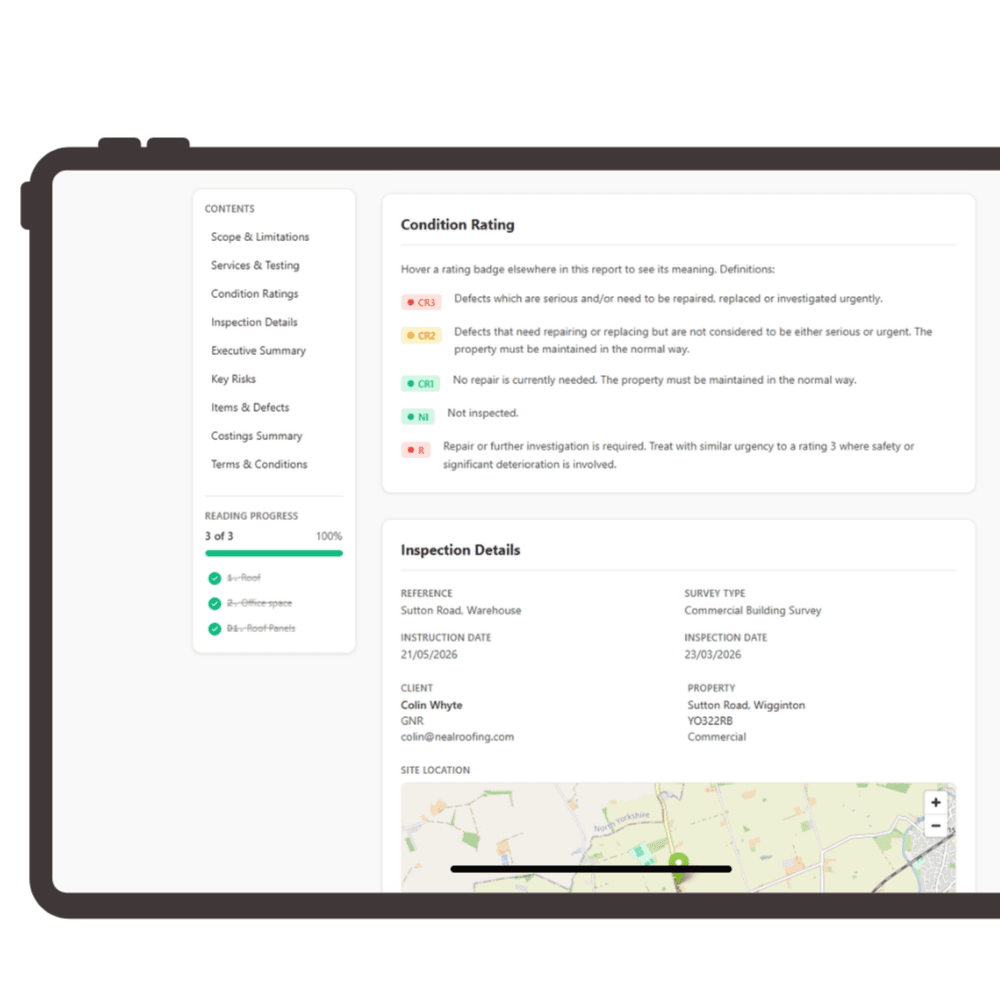
InstaSurv building survey report interface showing condition ratings, inspection details and reading progress

Built for real building surveying workflows

  • Digital building inspections and condition assessments
  • Structured defect recording and photographic evidence
  • Professional, branded building survey reports
  • Surveying CRM, quotations and appointment management
  • Schedules of work, contractor tendering and project tracking

Stop Managing Building Surveys Across Five Different Systems

Building surveying involves far more than walking around a property and writing a report.

A typical instruction might involve receiving an enquiry, issuing a quotation, arranging access, inspecting the building, photographing defects, reviewing technical information, preparing recommendations, producing a report and communicating the findings to the client.

For many surveying practices, each stage still happens somewhere different.

Inspection notes sit on a phone or notepad. Photographs are stored in separate folders. Survey reports are prepared in Word. Quotes and instructions are tracked in spreadsheets. Contractor enquiries are managed through email.

The result is unnecessary administration, duplicated information and a greater risk of losing context between the site inspection and final deliverable.

InstaSurv brings those activities into one connected working environment.

Rather than treating a building survey as an isolated document, InstaSurv links the inspection, property, client, report and subsequent work under the same instruction.

Less repetitive administration

Keep client details, property information, bookings and inspection records connected, reducing the need to enter the same information repeatedly.

Better-organised survey evidence

Associate defects, photographs, annotations and condition information with the relevant inspection and building elements.

A clearer route to report completion

Move from recorded observations to a structured client report without building the document from disconnected notes and photo folders.

Greater practice visibility

Understand which enquiries, appointments, reports and associated activities require attention across the business.

From Building Inspection to Professional Report in One Workflow

InstaSurv connects the key stages of a surveying instruction through its reporting and practice management tools.

  1. 1

    Step 1 — Receive and Manage the Survey Instruction

    Start with an organised instruction, not another email thread.

    Manage incoming enquiries, client information, property details, quotations and bookings using InstaFlow, the practice management layer within InstaSurv.

    Keep the commercial and administrative information associated with each instruction together, so your team understands what has been requested, who is responsible and what happens next.

    • Enquiry and lead management
    • Survey quotations and appointment booking
    • Property and client records
    • Surveyor assignment and diary management
    • Automated communications
    • Instruction and workflow visibility
  2. 2

    Step 2 — Complete the Building Inspection

    Capture information where the work actually happens.

    Use InstaReport to document property condition and defects during the inspection.

    Record observations against building elements, associate relevant photographs and build an organised body of evidence for the report.

    Building surveyors can document matters such as visible deterioration, moisture-related defects, roofing concerns, building fabric issues, maintenance requirements and other observations within the agreed inspection scope.

    The inspection workflow supports structured information capture rather than relying entirely on unorganised notes.

  3. 3

    Step 3 — Record Defects and Photographic Evidence

    Keep the evidence connected to the finding.

    A useful building survey report must explain what was observed, where it was observed and why it matters.

    InstaSurv enables surveyors to associate photographic evidence and observations with building elements, add annotations and record condition information.

    This makes it easier to return to the findings during report preparation and helps clients understand the issues described.

  4. 4

    Step 4 — Prepare the Building Survey Report

    Turn survey observations into a professional client deliverable.

    Use InstaReport to prepare building survey reports using structured information captured during the instruction.

    The report builder supports reusable defect information, reference material, condition ratings and practice-branded PDF output.

    Review the findings, explain their significance, develop recommendations and prepare the report for client delivery.

    Professional judgement remains with the responsible surveyor. Software supports the reporting process; it does not replace the inspection, technical assessment or professional responsibility.

  5. 5

    Step 5 — Deliver the Report to Your Client

    Make the final report part of a professional client experience.

    Share completed reports through InstaSurv's digital delivery workflow.

    Clients can access released documents and relevant instruction information through the client portal, reducing the need to manage every update through separate email conversations.

    Your practice retains control over the information made available to clients and when it is released.

  6. 6

    Step 6 — Manage the Work That Follows

    Because finding a defect is often only the beginning.

    Where a building survey identifies remedial work, planned maintenance or further investigation, InstaSurv can connect the findings with downstream workflows.

    Use InstaScope to prepare structured scopes of work, InstaTender to request and compare contractor pricing, and InstaManage to help track awarded work.

    Survey information can therefore support the next stage of property management rather than becoming a standalone PDF that must be manually translated into another system.

Building Surveying Software Designed Around the Way You Work

Digital Building Inspection Software

Move beyond separate inspection forms, handwritten notes and disconnected photographs.

InstaReport provides a structured environment for recording property condition, building element observations, access information and inspection findings.

Keep the inspection organised from the outset, with information connected to the correct property and instruction.

Building Survey Report Writing Software

Preparing a detailed building survey report requires clear descriptions, supporting evidence and considered recommendations.

InstaSurv's report builder helps organise this information into a professional document.

  • Structured report sections
  • Reusable defect and reference libraries
  • Building element observations
  • Condition ratings
  • Photographic evidence and annotations
  • Practice-branded PDF reports
  • Client report delivery

Property Defect Management

Building defects need context.

A photograph alone may not explain whether an issue requires monitoring, maintenance, further investigation or urgent action.

InstaSurv helps organise observations alongside relevant evidence, descriptions and recommendations so findings can be reviewed and communicated more clearly.

Building Surveying CRM

Managing a surveying practice involves enquiries, appointments, clients, quotations and administrative work alongside technical inspections.

InstaFlow connects these activities with the survey instruction.

Your team can work from a shared view of the customer relationship and survey workflow rather than maintaining separate systems for sales and delivery.

Surveyor Scheduling and Appointment Management

Coordinate bookings and surveyor workloads through the practice calendar.

Manage survey appointments, assigned team members and diary information in the same environment used for the associated instruction.

For practices with multiple surveyors, a connected schedule helps the office team maintain visibility across ongoing work.

Digital Photographic Evidence

Building survey reports often rely on photographs to demonstrate and explain findings.

InstaSurv supports photographic evidence and annotation within its reporting process, helping surveyors keep images associated with the appropriate inspection observations.

Client Portal and Report Delivery

Give clients a more organised way to access information relating to their instruction.

InstaHub provides a client-facing environment for selected property information, report documents and communications.

Your practice decides what is available and when.

Schedules of Work and Tender Management

When inspection findings result in a repair or improvement project, use InstaScope to develop a structured scope or bill of quantities.

Issue tender invitations through InstaTender, receive contractor pricing and compare submissions against the same underlying scope.

This extends InstaSurv beyond report writing into the management of recommended work.

See building survey report software, surveying CRM and InstaScope™ & InstaTender™ in more detail.

Software for Residential and Commercial Building Surveying

Building surveyors work across a wide range of property types, inspection scopes and client requirements. InstaSurv provides connected inspection, reporting and practice management capabilities that can support different surveying activities.

Residential Building Surveys

Organise inspections, record building defects, prepare condition-based reporting and manage the associated customer journey. Useful for surveyors handling individual residential property instructions and professional reporting.

Commercial Building Condition Surveys

Document the condition of offices, retail premises, industrial buildings and other commercial properties. Maintain structured observations, photographs and recommendations alongside the property record.

Schedules of Condition

Record the observed condition of premises at a particular point in time using descriptive inspection notes and supporting photographic evidence. A clear record can assist with future comparison, subject to the inspection scope, agreed reporting methodology and applicable contractual requirements.

Planned Preventative Maintenance

Use survey findings to inform maintenance priorities, repair programmes and planned work. InstaSurv's connected scope and project workflows can support the transition from identified defects to organised maintenance activity.

Technical Due Diligence and Acquisition Inspections

Bring together inspection observations, condition information and relevant technical findings when assessing buildings for acquisition or investment. The responsible professional remains accountable for the extent of the inspection and the conclusions in the report.

Building Safety and Compliance Inspections

InstaSurv also supports wider inspection activities, including fire safety and property condition workflows. This can be useful for multidisciplinary consultancies and property teams managing different types of inspection under one platform.

Most Surveying Software Helps You Write the Report. InstaSurv Helps You Manage Everything Around It.

Report-writing software solves an important problem, but preparing the report is only one part of a surveying business. InstaSurv connects the commercial, technical and operational stages of a property instruction.

Comparison of traditional disconnected surveying workflows with InstaSurv
Your workflowTraditional disconnected approachWith InstaSurv
New enquiriesEmail, forms and spreadsheetsConnected enquiry and CRM records
Survey bookingsSeparate calendar systemsScheduling linked to the instruction
Site inspectionNotes and separate photographsStructured digital inspection records
Defect recordingDocuments and photo foldersObservations linked to building elements
Report writingManual document assemblyIntegrated report builder
Client deliveryEmail attachments and status enquiriesBranded reports and client portal
Remedial worksSeparate spreadsheetsConnected scope of works
Contractor tenderingIndividual email conversationsStructured tender invitations and comparison
Project follow-throughStandalone tracking toolsLinked project delivery workflow

The value is not simply having more features.

It is having information available across different stages of the instruction without repeatedly rebuilding the same record.

From first enquiry to completed report — and, where required, through to remedial works — InstaSurv keeps the workflow connected.

Building Surveying Software for Independent Surveyors and Growing Practices

Independent Building Surveyors

Run a professional surveying practice without relying on a collection of disconnected administrative tools. Manage enquiries, bookings, inspections and reports within one working environment.

Small Surveying Practices

Keep office administration and technical delivery connected as the number of instructions increases. Maintain shared access to relevant client, property and survey information.

Multidisciplinary Building Consultancies

Support different types of inspection and reporting while retaining connected property and customer records. For consultancies also involved in specifications and remedial projects, use the wider workflow tools when appropriate.

Commercial Property Consultants

Organise building condition information, photographic evidence, acquisition-related inspections and maintenance recommendations.

Housing Associations and Property Asset Teams

InstaSurv's wider platform provides additional workflows for stock condition, building safety evidence, maintenance planning and property portfolio management. Organisations with larger property portfolios can explore the separate InstaSurv Enterprise offering.

Explore InstaSurv Enterprise

A Building Survey, From Enquiry to Completed Works

Consider a building surveying practice instructed to assess the condition of a commercial property.

The surveyor needs to arrange access, inspect the building fabric, photograph visible defects, prepare a detailed report and communicate recommendations to the client.

Some recommendations may also require quotations from specialist contractors. Here is how that workflow can be organised in InstaSurv.

  1. 01

    Instruction received

    The practice records the enquiry, client details, property information and proposed appointment using InstaFlow.

  2. 02

    Inspection completed

    The surveyor attends the property and uses InstaReport to record observations, building condition information and supporting photographs.

  3. 03

    Findings reviewed

    The surveyor reviews the recorded information, documents the significance of the findings and prepares professional recommendations.

  4. 04

    Report delivered

    A branded building survey report is prepared and shared with the client through the reporting and delivery workflow.

  5. 05

    Remedial works scoped

    Where appropriate, the survey findings inform a schedule of works using InstaScope.

  6. 06

    Contractor pricing obtained

    A tender package can be issued through InstaTender, with contractor submissions compared within the instruction.

  7. 07

    Works coordinated

    Following appointment and award, the relevant project information can be progressed through InstaManage.

One property. One connected workflow.

This is an illustrative workflow showing how the platform's modules can be used together. The exact steps depend on your appointment, subscriptions and working practices.

What Should You Look for in Building Surveying Software?

Choosing building surveying software is not simply about finding a tool that generates PDF reports. Before committing to a platform, consider how well it supports the full surveying process.

  1. 1. A Practical Inspection Workflow

    Can surveyors record property observations and supporting evidence in a structured format during an inspection?

  2. 2. Flexible Professional Reporting

    Does the software support the level of detail, professional judgement and report presentation your practice requires? Can you review and edit findings before the report is issued?

  3. 3. Photographic Evidence Management

    Can photographs be associated with relevant observations and clearly presented in the final report?

  4. 4. Defect and Reference Libraries

    Can commonly used technical descriptions be organised and reused appropriately without replacing the surveyor's judgement?

  5. 5. Practice Management

    Can the platform help manage enquiries, quotations, appointments, customer information and survey instructions?

  6. 6. Client Communication

    Can clients receive reports and track relevant instruction information through a professional delivery experience?

  7. 7. Remedial Works Workflow

    If your practice also prepares scopes of work, requests contractor prices or oversees projects, can the software support those activities?

  8. 8. Onboarding and Support

    Does the provider offer clear guidance on setting up the software and integrating it into everyday practice?

The right system should reflect how your surveying practice actually operates rather than forcing every instruction into an unsuitable process.

Building Surveying Software and Professional Responsibility

For chartered surveyors and surveying practices, software must support professional working practices, not replace them.

The scope of inspection, reporting methodology, limitations, condition assessment and recommendations must remain appropriate to the individual instruction.

Where applicable, practices should consider relevant RICS standards and guidance when configuring their reports and inspection procedures.

InstaSurv includes features such as structured inspections, condition ratings, supporting photographs, reference libraries and editable professional report content. These can help organise the evidence and reporting process.

However, no software platform can independently guarantee that a report meets every professional requirement. The responsible surveyor must ensure that the inspection, report content and final conclusions meet the standards applicable to their work.

Useful reference: Royal Institution of Chartered Surveyors.

See What Building Surveying Software Looks Like in Practice

Choosing surveying software is easier when you can see the reporting and inspection process rather than relying entirely on a feature list.

Explore how InstaSurv handles:

  • Inspection records and building element observations
  • Condition ratings and defect descriptions
  • Photographic annotations
  • Structured report sections
  • Practice-branded PDF output
  • Survey instructions and appointment management
  • Scopes of work and tendering

Prefer to see client delivery first? How your survey is delivered.

InstaSurv report editor preview with structured survey sections and condition ratings

Frequently Asked Questions About Building Surveying Software

What is building surveying software?
Building surveying software is digital software used to support property inspections, condition assessments, defect recording, photographic evidence, survey reporting and related practice workflows. Depending on the platform, it may also include appointment scheduling, CRM, client portals and maintenance planning.
What is the best software for building surveyors?
The best building surveying software depends on the type of surveys you complete, your reporting requirements, team size and wider business processes. A sole practitioner may prioritise report writing and affordability, while a larger practice may also require CRM, scheduling, team management and project workflows. InstaSurv is designed to connect reporting with wider surveying practice management.
Can I use InstaSurv to write building survey reports?
Yes. InstaSurv includes InstaReport, a report-writing and inspection tool with structured observations, defect information, photographic evidence, condition ratings and practice-branded PDF output. The surveyor remains responsible for reviewing the report and its technical conclusions.
Does InstaSurv support commercial building surveys?
InstaSurv supports building condition inspection and reporting workflows relevant to commercial surveying. Building consultants can use the platform to organise property information, inspection records, photographic evidence and reports, with additional tools for scopes of work and tendering where required.
Can InstaSurv help manage residential building surveys?
Yes. InstaSurv provides inspection, report-writing and practice management functionality useful for residential surveying instructions. Surveyors must ensure that any report template and completed report meet the requirements of the specific appointment and applicable professional standards.
Can I add photographs and defects to a survey report?
Yes. InstaReport supports inspection observations, building element defects, photographs and annotations, helping surveyors organise evidence and communicate findings in the final report.
Is InstaSurv suitable for independent building surveyors?
Yes. InstaSurv offers a reporting and practice management workflow suitable for independent professionals, with additional capabilities for practices managing larger numbers of instructions and staff.
Does InstaSurv include surveying CRM software?
Yes. InstaFlow provides CRM and practice management tools for enquiries, quotations, bookings, customer records, scheduling and operational workflows.
Can I create schedules of work from survey findings?
Yes. InstaScope can use relevant inspection findings to help build structured scopes of work and bills of quantities, which can then be used in associated tendering workflows.
Does InstaSurv replace Microsoft Word and Excel?
InstaSurv provides native tools for reporting, CRM, scopes of work and tendering that can reduce reliance on separate Word documents and spreadsheets for supported workflows. Whether it replaces every existing tool depends on your practice's requirements and document processes.
Is building surveying software useful for larger practices?
Yes. A shared system can help practices coordinate multiple surveyors, instructions, appointments and report workflows. InstaSurv also offers broader modules for project delivery, client communications and property portfolio management.
Can I try InstaSurv before subscribing?
InstaSurv currently advertises two free reports so surveyors can explore its reporting functionality before selecting a paid subscription. Refer to the current pricing and registration pages for full terms and available plans.
Is InstaSurv RICS-approved software?
InstaSurv should not be described as RICS-approved unless that status has been formally established. The platform supports structured reporting and professional inspection workflows, but each surveyor remains responsible for following the applicable RICS standards and other professional requirements.

Spend More Time Surveying. Less Time Managing the Process.

Building surveying software should do more than help you complete a report.

It should help you organise instructions, capture reliable inspection evidence, communicate with clients and keep the information connected as the work progresses.

InstaSurv brings building inspections, professional reporting, practice management and downstream property workflows together in one platform.

Start with two free reports and see how InstaSurv fits your surveying practice.

Built for UK surveyors, building consultants and property inspection teams.